OAuth Part 1 - The Problem, Solution, Terminology and Flows Explained

First, Let's Discuss the Problem ..!
Does this image look familiar? (Facebook)
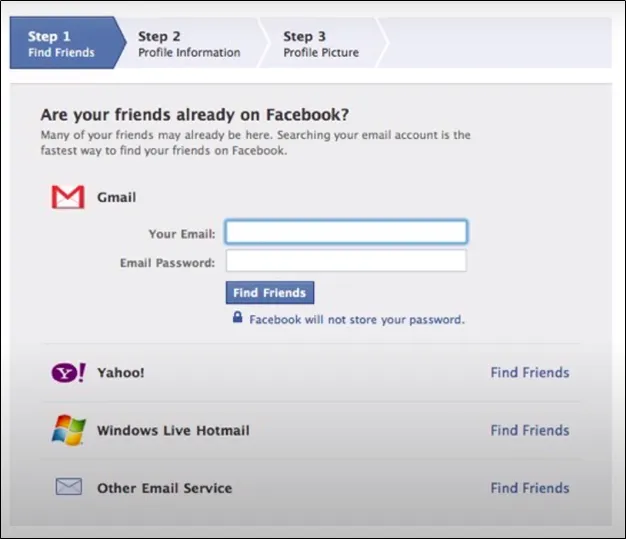
If you were around during 2008–2010, when Facebook was rapidly growing, you may have seen this before. At that time, Facebook asked users to enter their Gmail address and password so it could access their contact list and suggest friends who were already on the platform. Do you see the problem with this method?
Another Example (Yelp)
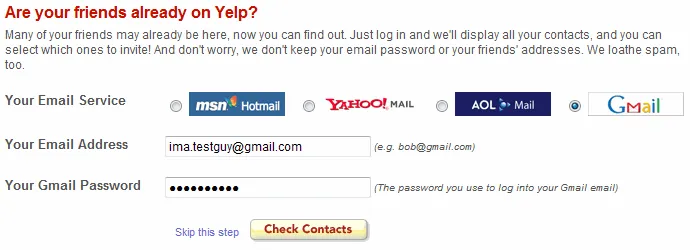
This is an image of Yelp from around 2008–2011. During sign up, it would ask you to enter your Gmail address along with your actual password. Yelp used your credentials to log in to your Gmail account on your behalf in order to access your contact list. This allowed Yelp to see which of your friends were already using Yelp and which were not, so you could invite them. Since Yelp was just starting out and had not yet built a strong reputation, many users were hesitant to trust it with sensitive information.
Do you see the problem now? Providing your credentials to another app can be risky. Many people use the same Gmail account across various platforms, including banking services, which poses a significant security risk. Sharing login credentials with an unverified site is not only unsafe but also poor security practice. Although Yelp promised that it would only access your contact list, it still had your password and could do more. Moreover, this approach of giving an app your credentials to act on your behalf creates complications when connecting to third party apps even if there are no security problems. For example, if you provided your credentials to both Facebook and Yelp, and later decided to disconnect from Yelp, you would have to change your Gmail password, thereby also unintentionally disconnecting you from Facebook, which is another problem.
So here is the big question:
How can I let a website access my data without giving it my password?
Second, Let's Discuss the Solution ..!
So how can we solve this ..?
From a high level perspective, we can start by not giving third party apps our password directly. Maybe we could give them something else, like an access token, that they can use to obtain the resource they need like the Gmail Contacts List, for example. That token would only have the privilege to access the Contacts List and nothing else, so Yelp wouldn’t be able to do more than that. For example, it wouldn’t be able to send emails on your behalf.
So, the flow would be like this: instead of Yelp asking me for my Gmail address and password, it would redirect me to the Gmail login page itself. Then I would enter my email and password, and if I log in successfully, Gmail would redirect me back to Yelp with the access token in the query parameters, which Yelp could extract and use to call the Gmail APIs to get the user’s contact list. Seems better, right? We can give this solution a better name: delegated authorization when a user wants to extend his privileges to access data from an external resource.
First Some Terminology You Need to Know
- Resource → Something you own as a user.
- Resource Owner → You as a user.
- Resource Server → The server that hosts the resource.
- User Agent → The application used to interact with the client, such as a browser or mobile app.
Client → Your web app. From the OAuth server’s perspective, it is a client because it requests access tokens from the authorization server.
Scope → In simpler terms, this is what we send to tell the Authorization Server what permissions we need so it creates the access token with those permissions, scopes defines the specific data and actions the client is permitted to access. For example, a scope might grant read-only access to contacts or full access to a user’s profile. The Authorization Server must maintain a predefined list of supported scopes, and the client must request scopes that align with the server’s allowed permissions.
Consent/Consent Screen → When logging into a website via Google, a pop-up appears after authentication asking, “Are you sure you want to give ‘Client_Name’ access to your profile?” This is the consent screen; it’s essentially explicit permission granted by the user to the authorization server, allowing the client to access their data based on the requested scope.
Redirect URL → The URL where the user is redirected after authorization (also known as a callback URL).
Authorization Grant → The result of the authorization flow. This grant is used to obtain an access token. In the authorization code flow, the grant is the temporary code returned to the client.
- Access Token → A token issued by the authorization server to the client. The client uses this token to access the resource server (external service).
- Note: The access token is opaque to the client. The client simply receives it from the Authorization Server and sends it to the resource server, which is responsible for validating and interpreting the token.
- Authorization Server → The server responsible for generating tokens. It must implement two endpoints (e.g., token and authorization endpoints).
- Note: The authorization server and resource server may be the same server.
Back Channel (Highly Secure) → A secure server-to-server communication channel (HTTPS) that is not exposed to user interference or interception. This does not exclusively mean backend-to-backend communication. For example, a Single-Page Application (JavaScript client) can use the back channel by making direct HTTPS calls without relying on browser redirects, thereby making HTTPS API calls directly from its code to the authorization server.
- Front Channel (Less Secure) → A communication method involving the user agent (browser redirects), which is more vulnerable to interception.
So Again, What is OAuth..?
OAuth stands for Open Authorization. As mentioned earlier, the solution is not to share your credentials with a third party app but rather to provide them with something else they can use, such as an access token. This enables you to grant limited access to your data on another service. For instance, you might want Yelp to access your Gmail contact list to find your friends in the app and invite others.
So, OAuth is the protocol for obtaining an access token. When we say protocol, we mean a series of steps that your app needs to follow. If we were making koshari (an Egyptian dish), we would need to follow the recipe (steps). It’s the same for OAuth; it’s the recipe (steps) to obtain an access token and OAuth defines a set of different recipes to obtain an access token, known as flows.
OAuth Flows
In OAuth 2.0, We Have 5 Main Flows:
- Device Code
- Client Credentials
- Resource Owner Password Credentials Flow (or Password Grant, Legacy)
- Implicit Flow (Legacy)
- Authorization Code
We need also to mention PKCE - Proof Key for Code Exchange. It’s not a grant by itself; we can say it’s an extension that essentially adds an extra security step in an OAuth flow. It was created because of the emergence of mobile devices, and this extension is used with Authorization Code and Device Code.
I will provide a summary for each of the 5 flows, and in other parts of this blog series we will discuss each one of them in more detail. also, I might not create a detailed article for the Device Code Flow since it is intended for web or mobile applications, so for that flow I will just provide a summary.
1. Device Code Flow
Device authorization grant is designed for Internet connected devices that either lack a browser to perform user agent based authorization (devices like smart TVs and printers) or are input constrained to the extent that requiring the user to input text in order to authenticate during the authorization flow is impractical (basically, devices that do not have a keyboard).
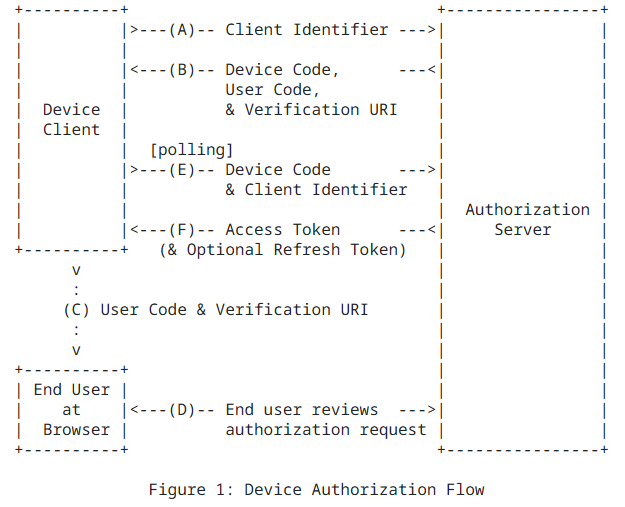
How the Flow Works
- You open your smart TV and want to log in to the Netflix app, for example.
- The app checks if you are authenticated or not.
- If not, then it will show you the sign in option.
- When you choose it, the app will send a POST request to the auth server with some metadata.
- The server will respond with some data, including a code and a URL to visit on your mobile or computer to enter the code.
- In Netflix’s case, it will show a code and a QR code that you can scan with your mobile.
- When you scan it, your mobile is redirected to Netflix, and it shows you the code to confirm it’s you.
- During all this, the TV keeps
polling, sending requests to the auth server to check if you have authorized the device. - If the flow succeeds and you authorize the device, the next poll response will contain an access token (or a refresh token).
- Now the TV can save the token, and you can use your Netflix account normally.
2. Client Credentials Flow
Used when an application (client) needs to access its own resources on a server (no user involved). Commonly used for server-to-server communication, background jobs, etc. 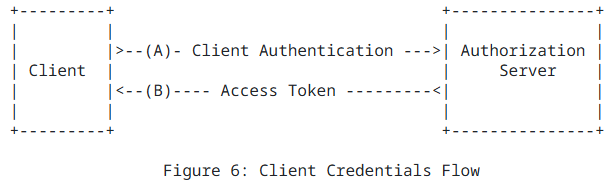
How the Flow Works This flow is very simple:
- Your app (like a backend server) wants to access an API, but not on behalf of any user just itself.
- The app knows its
client_idandclient_secret(like a username and password for the app). - The app sends a POST request to the auth server (token endpoint) with metadata like
client_idandclient_secret. - The auth server checks if the
client_idandclient_secretare correct. - If they are valid, the server responds with an access token.
- Now the app can use this access token to call protected APIs by putting it in the request header.
- No user is involved; it’s all app-to-app communication.
- When the token expires, the app can request a new one by repeating the same request.
3. Resource Owner Password Credentials Flow (Also Known as Password Grant)
This flow in OAuth 2.0 is marked as legacy, meaning it is not recommended for use due to significant security risks.
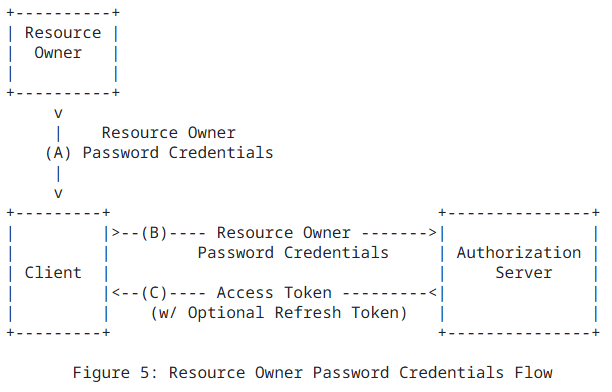
How the Flow Works
- This flow is used when the user directly trusts the app (like first party apps).
- The app shows a login form asking the user for their username and password.
- The app sends a POST request to the auth server (token endpoint) with the entered credentials and other metadata.
- The auth server verifies the username and password.
- If valid, the server responds with an access token (or refresh token).
- The app uses the access token to call protected APIs.
- Because the app handles the user’s password directly, this flow is very risky and not recommended anymore.
4. Implicit Flow
This flow in OAuth 2.0 is also marked as legacy, meaning it is not recommended for use due to significant security risks.
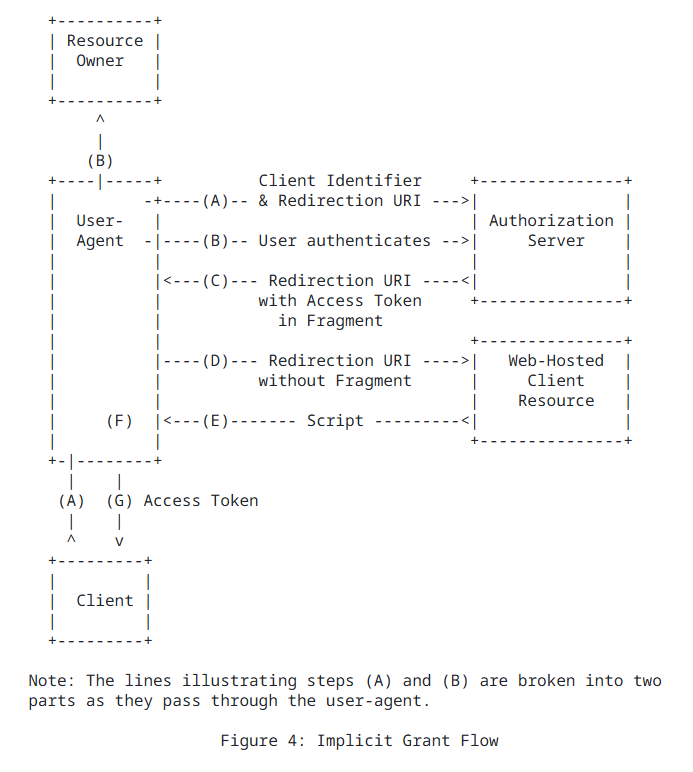
- This flow was designed for apps running in the browser (like Single Page Applications) where storing a
client_secretsecurely is not possible. - The user tries to log in through the app.
- The app redirects the user to the authorization server with a URL that includes meta data like
client_id,redirect_uriandscope - The user logs in and grants permission.
- After successful login, the authorization server immediately redirects the user back to the app’s
redirect_uri, but includes theaccess_tokendirectly in the URL fragment (after the#). - The app reads the
access_tokenfrom the URL. - Now the app can use the
access_tokento call protected APIs. - This flow is now considered legacy and is not recommended anymore, replaced by Authorization Code Flow with PKCE for better security.
5. Authorization Code
this flow is the most known flow and any one try to explain oauth start with it as it have the most steps, its very similier to the implicit flow but some added steps for secuirity
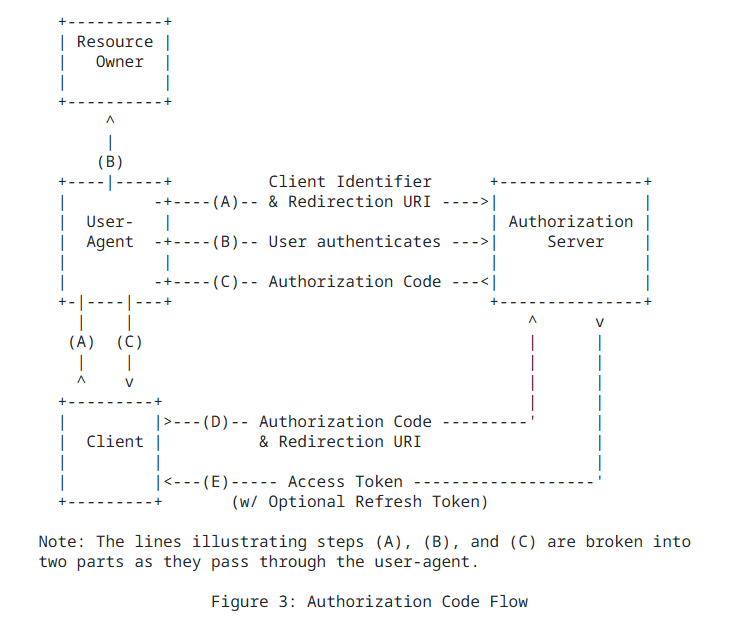
How the Flow Work Without PKCE
- The user tries to log in through the app (usually a web app).
- The app redirects the user to the authorization server with a URL that includes meta data like
client_id,redirect_uriandscope - The user logs in and grants permission (Clicking
allowin the consent screen we mentioned in the terminology section). - The auth server redirects the user back to the app’s
redirect_uriwith an authorization code in the URL.
- Notes: in the
implicit flowit would send thetokenin this step not acode
- The app takes the authorization code and sends a POST request to the token endpoint with
codeand other meta data - The auth server verifies the code and the client credentials.
- If everything is valid, it responds with an access token (and maybe a refresh token).
- The app uses the access token to call protected APIs.
Now if we added PKCE to this flow Authorization Code + PKCE
- Before redirecting the user in Step 2, the app generates:
- a
code_verifier(random string) - a
code_challenge(hash of thecode_verifier)
- a
- and when redirecting to the authorization server, the app also sends:
code_challengecode_challenge_method(usuallyS256)- Later, in Step 5 when exchanging the authorization code for an access token, the app sends:
code_verifier
I know you may have a couple of questions about this flow… for example, why does the auth server return a code instead of a token when it redirects? Also, why is there an extra step with PKCE?
- I will answer, but not in detail, as we will write a separate article for this flow with a lot of details for each step.
The first question… why return a code? Why this extra step?
Short answer: to protect the access token from being exposed directly in the browser or URL.
In the implicit flow, when the auth server redirects, it returns the access token in the URL. This is bad practice because it can be intercepted, as here we use the front channel. By adding the code extra step and returning it in the URL instead of the token, we can make a back channel call to the auth server to exchange the code for an access token.
The second question… if we use a code for more security, why add another step with PKCE and send more metadata and another validation step for code_verifier?
Short answer: Because some apps (like mobile apps and SPAs) can’t fully protect their client secrets, and anyone can inspect them.
PKCE protects against an attacker stealing the code itself during the first redirect.
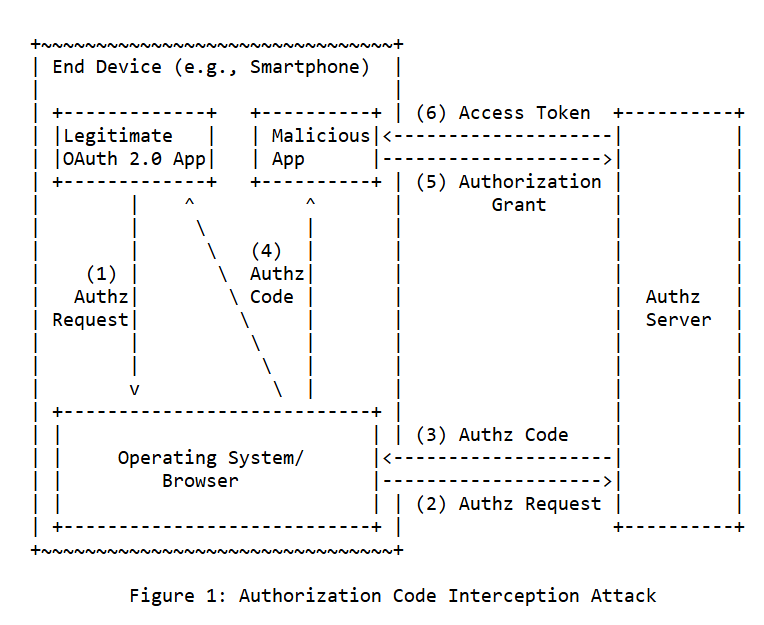
It helps us guarantee that the app that asked for the code is the same app that is trying to exchange it for an access token.
We will talk about this in more detail in the next parts of this series.
OAuth 2.1
Now OAuth2.1 is Coming, So Let’s Address Its Changes (Still a Draft)
What Will Change…?
- We’ll highlight the major changes, but you can search for more details. These two changes wrap the others:
Resource Owner Password Credentials GrantandImplicit Grant Floware deprecated and removed from the protocol specification.- Using
PKCEwithAuthorization Code Flowwas optional, but now it is required.